Architecture Guide
This guide explains the module structure and design philosophy of the agenticstar-platform SDK.
Design Philosophy
The agenticstar-platform SDK provides only platform infrastructure (DB, events, memory, storage, RAG, security). Developers have complete freedom to design agent logic (prompt design, tool selection, execution flow).
SDK Layer Architecture
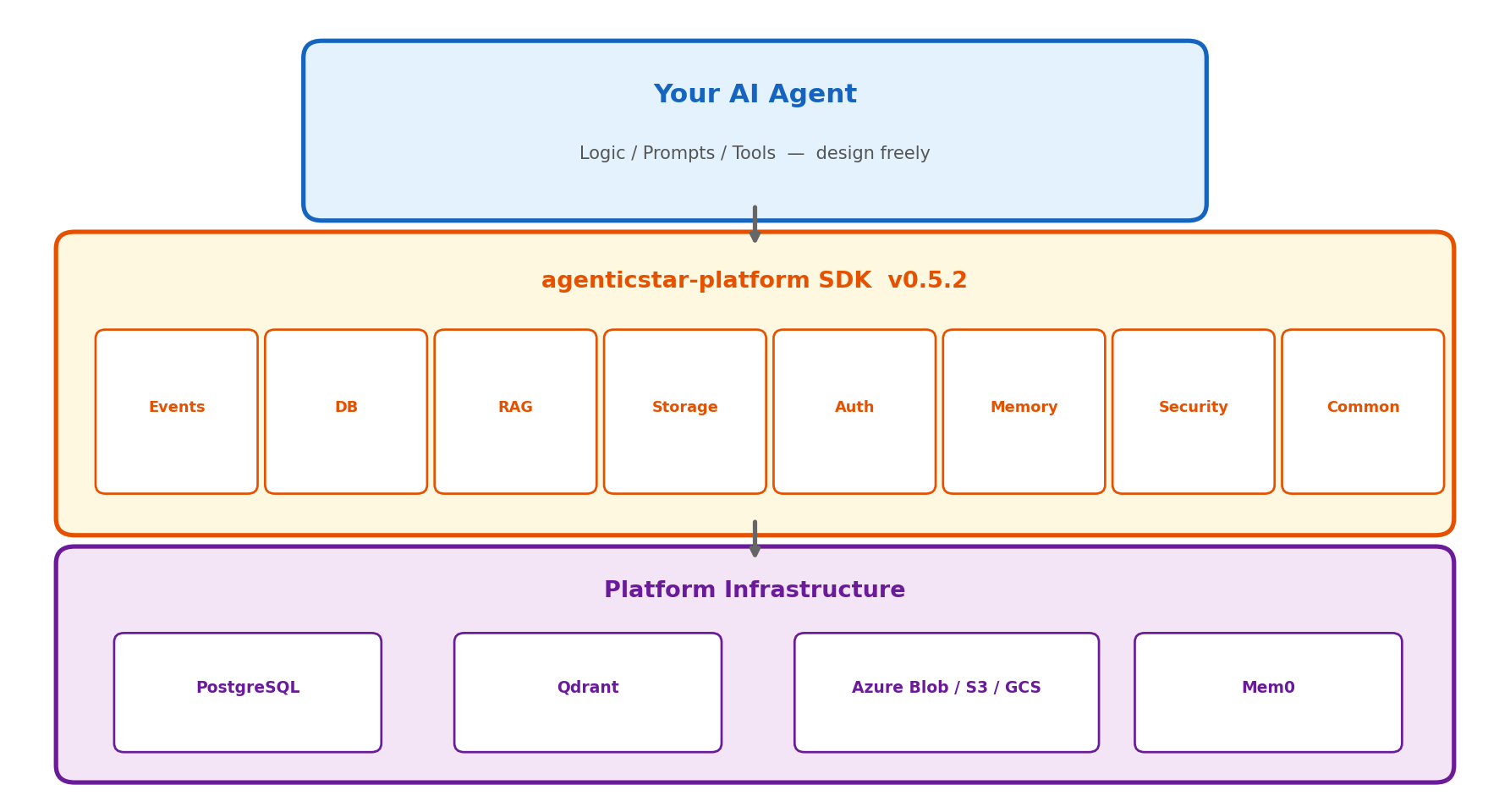
The SDK is composed of a 3-layer architecture.
| Layer | Role | Responsibility |
|---|---|---|
| Your AI Agent | Agent logic (prompts, tools, flow) | Freely designed by developers |
| SDK | Access to platform infrastructure | Provided by agenticstar-platform |
| Infrastructure | Databases, vector DBs, storage, etc. | Managed by the platform |
Module List
Each module can be installed and used independently. There are no implicit dependencies between modules.
| Module | pip extras | External Deps | Description |
|---|---|---|---|
events | (core) | None | SSE / Webhook / DB event delivery |
db | [db] | asyncpg, azure-identity | PostgreSQL + Azure AD auth |
rag | [rag] | qdrant-client, openai | Vector search + Embedding |
storage | [storage] | azure-storage-blob, boto3, google-cloud-storage | Multi-cloud object storage |
auth | (core) | httpx | AGENTIC STAR Auth API client |
memory | [memory] | mem0ai | Semantic memory (Mem0 + Qdrant) |
security | [security] | httpx, google-cloud-dlp | Content moderation + PII detection |
common | (core) | None | Validation + secret masking |
metering | (core) | litellm (optional) | LLM usage & cost metering (ledger + daily rollup, v0.5.15+) |
lab | [lab] | asyncpg, azure-identity, qdrant-client, openai, boto3 | Credential-free local integration lab (Docker Compose, v0.5.35+) |
Data Flow
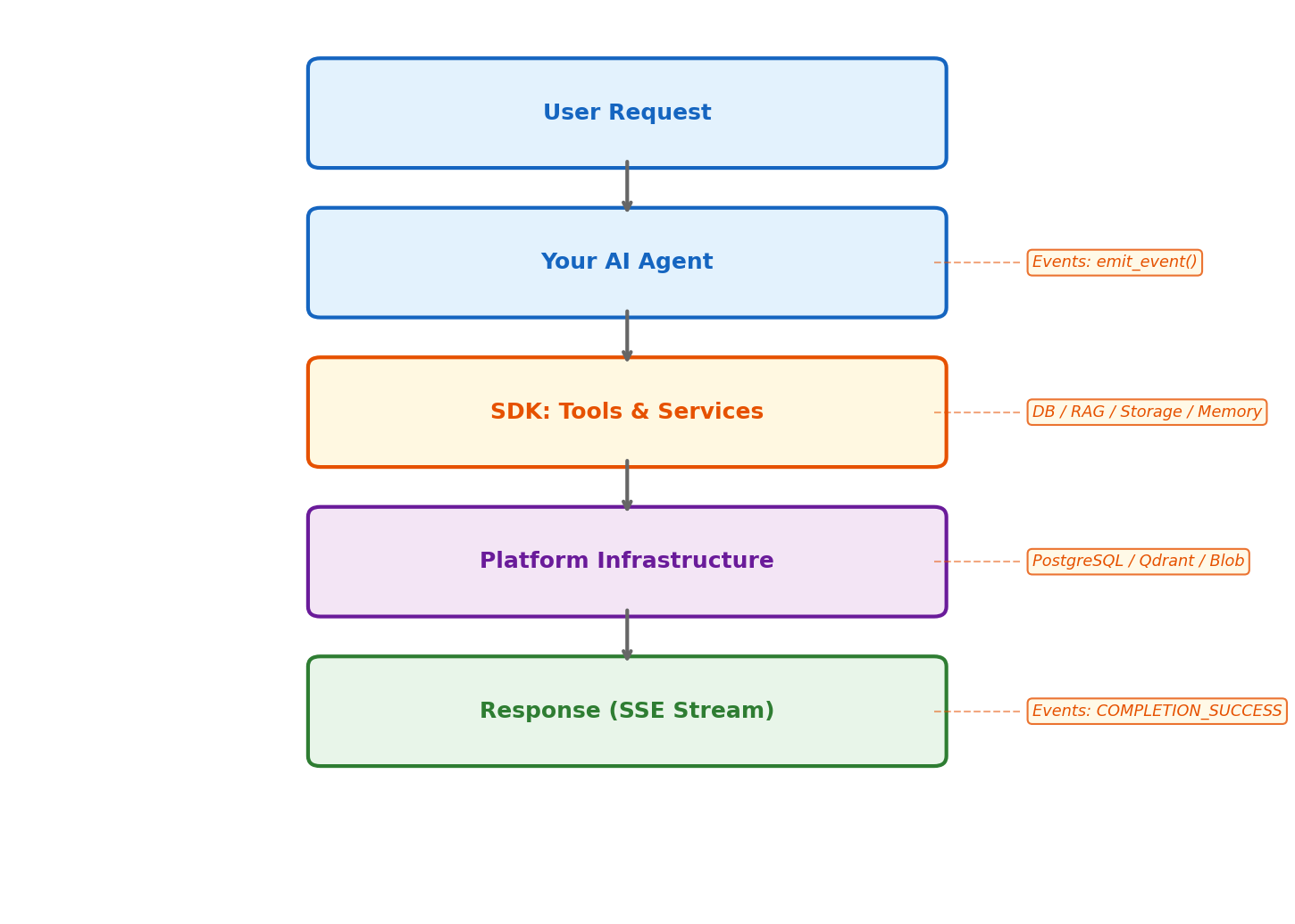
- User Request — A request from the user reaches the agent
- Your AI Agent — Processes while streaming progress via the SDK's
EventEmitter - SDK — Calls modules such as DB, RAG, Storage, and Memory
- Infrastructure — Accesses PostgreSQL, Qdrant, cloud storage, etc.
- Response — Delivers the final response via SSE with
EventType.COMPLETION_SUCCESS
Configuration Management
All SDK modules read configuration from config.toml. Settings can be loaded uniformly via the from_toml() method.
config.tomlToml
[database]
host = "your-db.postgres.database.azure.com"
port = 5432
database = "agenticstar"
username = "agent_user"
pool_min_size = 2
pool_max_size = 10
# Set to true for Azure AD auth (otherwise set password for password auth)
use_azure_ad = true

[database.azure_ad]
tenant_id = "your-tenant-id"
client_id = "your-client-id"
client_secret = "your-client-secret"

[rag.qdrant]
url = "http://qdrant.internal:6333"
collection_name = "knowledge_base"
vector_size = 1536

[rag.embedding]
base_url = "https://your-endpoint.openai.azure.com/"
api_key = "your-api-key"
model = "text-embedding-3-large"

[storage.azure]
bucket_name = "agent-files"
connection_string = "DefaultEndpointsProtocol=https;..."

[memory.llm]
model = "azure_openai/gpt-4.1"
api_key = "your-api-key"
base_url = "https://your-endpoint.openai.azure.com/"

[security]
provider = "azure"
content_safety_endpoint = "https://your-cs.cognitiveservices.azure.com/"
content_safety_api_key = "your-key"
Loading from config.tomlPython
from agenticstar_platform.db import PostgreSQLConfig
from agenticstar_platform.rag import QdrantConfig, EmbeddingConfig

db_config = PostgreSQLConfig.from_toml("config.toml")
qdrant_config = QdrantConfig.from_toml("config.toml")
embed_config = EmbeddingConfig.from_toml("config.toml")
Example Project Structure
my-agent/
├── config.toml              # SDK settings
├── main.py                  # Agent entry point
├── agent.py                 # Your agent logic
├── tools/                   # Custom tools
│   ├── search.py
│   └── file_ops.py
├── Dockerfile
└── requirements.txt
Next Steps
Deploy Guide
Docker build and platform registration steps
Events / Streaming Guide
Implementation details for SSE event delivery